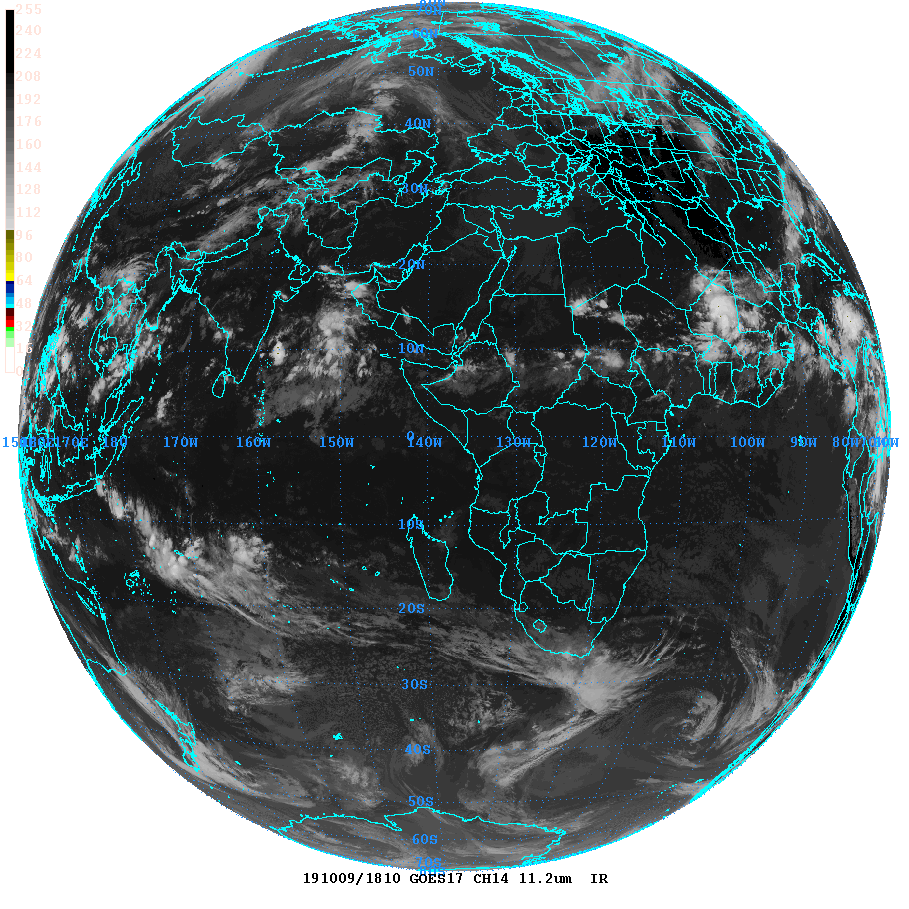

By default, the new GOES-17 full disk level 2 satellite data is improperly mapped by GEMPAK 7.5.1. From a level 2 netcdf4 file with this name: OR_ABI-L2-CMIPF-M6C14_G17_s20192821810340_e20192821810340_c20192821810340.nc you get the image below on the left. Note that Africa and Asia are plotted on the globe as if seen from the opposite side of the earth. By editing a shapefile, hipowo.gsf, and removing all areas outside the longitude range of the satellite view, I have been able to create the image below on the right.
| |
The procedure for creating the shapefiles is this:
Note, the underlying problem with GEMPA 7.5.1 seems to be that it is
not properly handling the x coordinate (longitude) of these satellite
projections. You can see this by choosing smaller GAREA values. For
example:
garea = 10;130;40;70
behaves as if you had specified negative longitudes, i.e., it gives
you what you'd expect to get if you had entered
garea = 10;-130;40;-70
I do not know exactly how to fix this in GEMPAK, so that is why I came
up with this workaround.
David Ovens
Department of Atmospheric Sciences
University of Washington
October 28, 2019